1
Go to the “Authorizations” tab
After logging in, click on the ‘Authorizations’ tab.
In accordance with the Regulation of the Ministry of Health, which came into force on August 2, 2023 (Journal of Laws 2023, item 1368), a patient who has an Internet Patient Account (IKP) is requested to grant access to our facility Centrum Medyczne BM Spółka z ograniczoną odpowiedzialnością
You can grant access after logging into your IKP account via www.pacjent.gov.pl or by using the mojeIKP mobile app. You will find instructions on how to do this below.
Below you will find step-by-step instructions on how to correctly grant access to the facility Centrum Medyczne BM Spółka z ograniczoną odpowiedzialnością in the IKP system.
After logging in, click on the ‘Authorizations’ tab.
Then choose the option ‘Share data with a doctor, nurse or pharmacist’. On the next page, click ‘Grant access’.
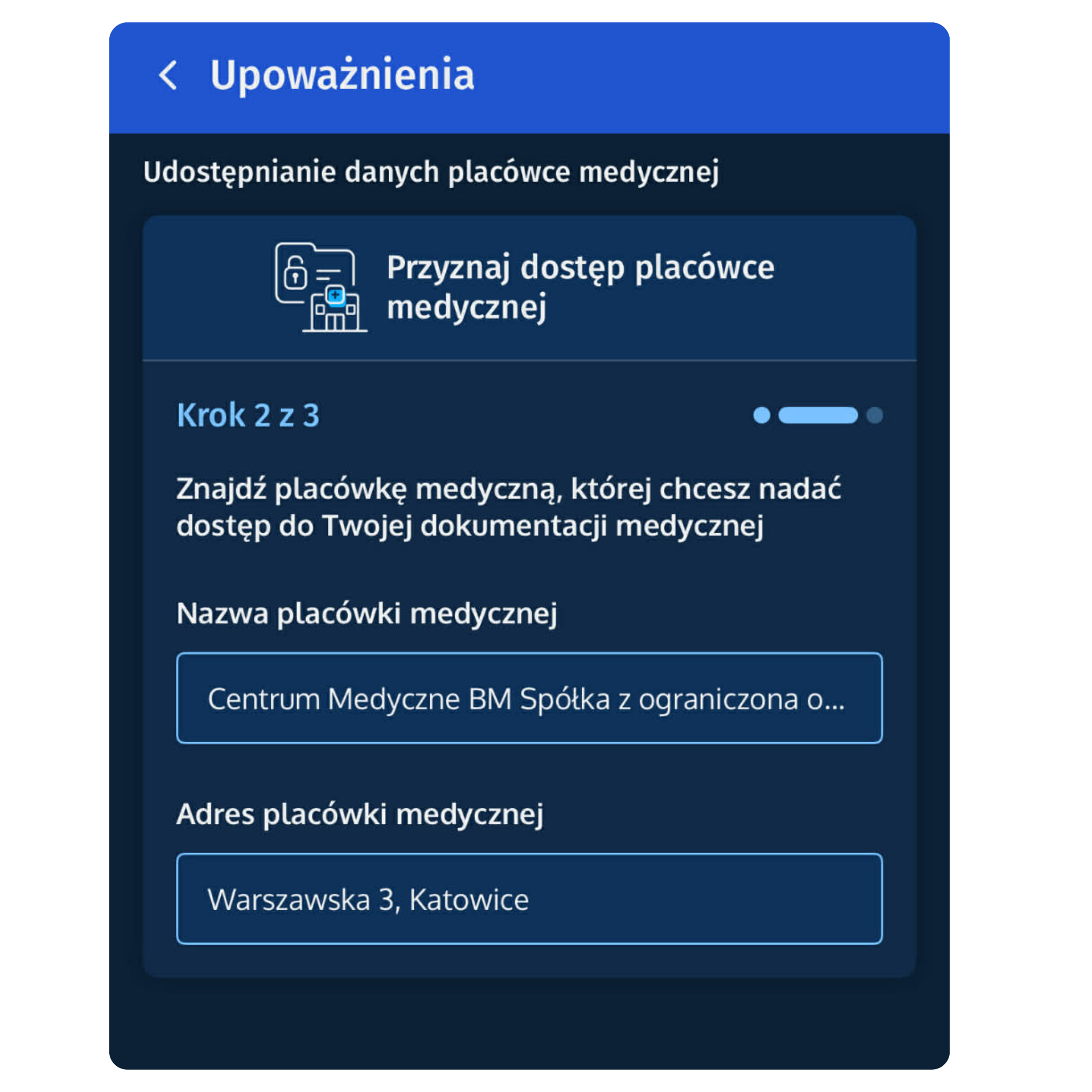
Select the option to grant access to a medical facility, then click ‘Next’. At this stage, in the ‘Medical facility name’ field, enter Centrum Medyczne BM Spółka z ograniczoną odpowiedzialnością SP. Z O.O. and select the facility option, as shown in the images below.
Before clicking ‘Next’, make sure your selection is checked!
Please select access exactly as shown in the image below. Remember that the “from” date can only be selected starting from the day you grant access. After selecting the appropriate permissions, save.